
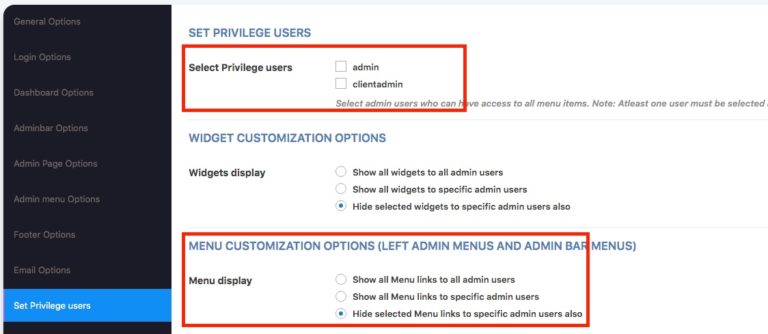
The Privilege Users feature allows you to control who can see all admin menu items, even if some of them are hidden using WPHazie settings.
There are two options available:
1. Show all menu links to all admin users
When this option is enabled, all hidden items-such as left admin menu items, admin bar menu items, and dashboard widgets – will be visible to all users with the default Administrator role.
All other users (non-admin users) will still have those items hidden.
2. Show all menu links to specific admin users
With this option, you can choose specific Administrator users who should see all hidden items.
Only the selected admin users will have full access, while:
- Other admin users (not selected)
- Non-admin users
will continue to see the restricted (hidden) view.
Important Notes
- This feature works only with the default WordPress Administrator role.
It will not work with other roles, even if those roles are given full access using role editor plugins. - This is especially useful when you want to give your client Administrator access, but still hide certain menus, settings, or elements to keep the dashboard clean and simple.
- If a user does not appear in the Privilege Users list, it means they are not assigned the Administrator role.
After Adding a New Admin User
Whenever you create a new Administrator user:
- Go to the WPHazie Settings page
- Click the Save button
This will refresh the settings and automatically add the new Administrator user to the Privilege Users list.
This feature helps you maintain full control over the admin area while still allowing selected users to access everything when needed.